Set Up Your Voicemail Greeting
Configuring your Voicemail greeting should be the first thing you do on the Phone System.
- Press the Message or envelope icon on your phone. If you don’t see this key, you can dial 9901
- Enter your password followed by # key
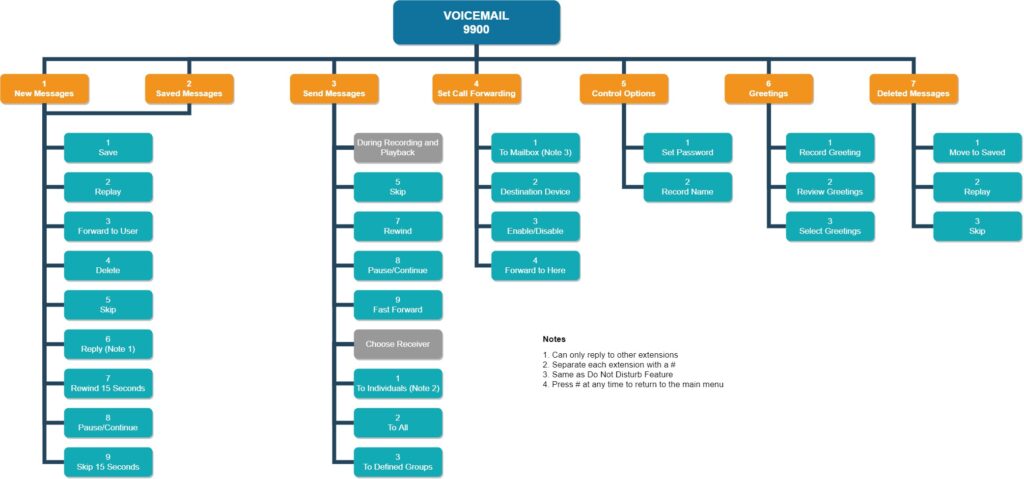
- Press 6 to change your greeting
- Press 1 to record your greeting
- Record your greeting and press # when finished
- Press 1 to save the recording
Retrieving Your Voicemail
You can pick up your voicemail by pressing the Message or envelope icon on your phone. Alternatively, you may dial 9901. You may also request to have your voicemail emailed to you, with 3 options:
- Sent to your email and saved to your phone
- Sent to your email only
- Sent to your phone only.
Retrieving Another User’s Voicemail
- Dial 9900 from your phone
- Enter the extension number when prompted
- Enter the password for the extension, followed by the # key
- Follow prompts to listen to voicemail
Transferring Voicemail to another User
- Dial 9901
- Dial your VM PIN to enter your VM box
- Press 1 for New Messages
- On the VM you want to send, Press 3
- Press 1 to send the VM to an individual
- It is going to say to record your message and press # once you are done. Press # right after the beep.
- Press 2 to confirm
- Dial the destination mailbox (extension) you want to send to
- Press 2 to send
Voicemail Access Diagram